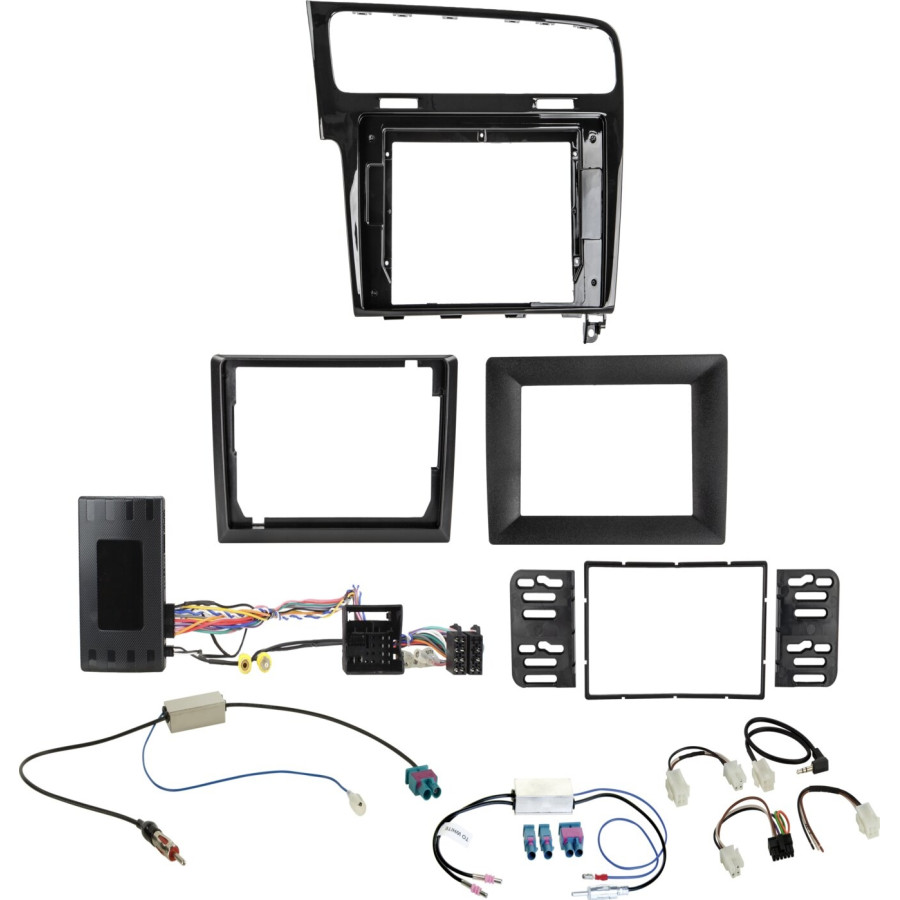
Radio panel 10" / 9" / 7" and radio connection set info adapter VW
Many car manufacturers install their own vehicle-specific radios, which are optically adapted to the center console.
Installation kits contain all the parts needed to replace an OEM device.
Depending on the vehicle's equipment, all adapters and interfaces required to operate the retrofit device and restore vehicle functions are included.
Please observe the installation recommendations for the individual components.
Before installation, please check the OEM device and the vehicle menu for various settings.
Please note that in some cases not all features are supported. For example, Trailer Assist, E Call or other driver assistance and comfort systems.
Compare the adapter plugs shown with those in your vehicle and make sure they match visually and technically.
Also check to see if one of the specified original factory radios was installed in your vehicle.
Check vehicle functions and vehicle settings before final installation.
Remark:
Vehicles with steering wheel remote control
CAN bus
Connection: 52-pin Quadlock VAG plug
blue: +12V antenna remote control
Before installing with OEM device, check the antenna's phantom power voltage by measuring: Vehicles with 8.5V antenna system > Article: 1524-29-1-0 Vehicles with +12V antenna system > Article: 1524-70-1-0
10â? modular devices with display and silver box 10â? devices with L-body on the bottom
9â? modular devices with display and Silverbox 9â? devices with L-housing at the bottom 9â? devices short housing
7â? modular devices with display and silverbox 7â? devices with L-housing at the bottom 7â? devices short housing
Device mounting with custom accessories Display with custom accessories
Vehicles with MIB II system and OEM device Composition Media
Call up menu settings > Connect purple/white reverse gear output Display menu settings > connect cinch(m) yellow to reversing camera input and configure Vehicle settings and vehicle information > mirrored on the rear view camera input of the retrofit monitor
Menu settings: Press the mouse button or voice key 5 times
Depending on OEM vehicle equipment and software: Not all vehicle settings are supported Not all vehicle functions are supported Not all vehicle information is visualized
Not for vehicles with: with MOST OEM sound system with radio preparation without factory pre-installation > Steering wheel remote control / loudspeaker / radio
Vehicles with parking assistance and front PDC > The front PDC is displayed after starting the vehicle Exit display > Confirm via PDC vehicle button
Suitable for the following vehicles:
VW Golf VII (AU) 11/2012 - 12/2016 VW Golf VII (AU) 03/2017 - 05/2020
Color: Piano lacquer black
Recessed recess 10â? radio display: 242.5 x 147 mm Installation opening 9â? radio display: 218.50 mm x 130 mm Installation cutout 7â? radio display: 178mm/173mm x 102mm/98mm
The following signals are available:
Vehicles that are re-imported or vehicles with different software may be incompatible in terms of features.
red: +12V ignition terminal 15 orange: +12V lighting terminal 58 purple/white: +12V reverse signal pink: speed signal green: ground GND handbrake signal
Total output load: 100 mA max.
Current requirement greater than 100 mA: 1 relay Coil resistance 75 Ohm min. 2 relays Coil resistance 150 Ohm min.
Steering wheel remote control
Climate control visualization Visualization of optical PDC CAR Menu Supported Vehicle Settings
Optional:
Adapter reversing camera VW MIB II PQ MQS > Article: 771324-1037 E-Call maintenance MAN/Seat/Skoda/VW 52Pin Quadlock > Article: 1424-28





 Free 30 days exchanges




 Secure payment